

Zapier is built for speed and ease of use, while Make is designed for flexibility and control.
Small businesses don’t win by copying enterprise tech stacks—they win by choosing the tool that fits their stage, their process, and their ambition.
The right choice is less about features and more about clarity of use-case, cost, and long-term scalability.
Every small business owner has faced it: late-night spreadsheets, invoices sent too late, leads sitting untouched in your CRM.
The dream of automation promises freedom, but the reality often feels like a tangle of duct-taped systems.
Most blogs treat Zapier vs. Make as a feature shootout—“which one has more integrations” or “which one has better pricing.”
That misses the point.
For SMBs fighting for time and margins, the real question is: Which tool helps me run a business that doesn’t run me?

The Mindset: Why Your Approach Is Already Broken
Most owners chase tools like they chase trends.
They ask, “What can this do?” instead of, “What problem am I actually solving?”
That’s backward.
Small businesses don’t have the luxury of endless licenses, IT teams, or consultants.
They need clarity.
Here’s the mindset shift:
Stop asking “which tool is better.” Start asking: Which tool matches my process maturity?
Stop thinking automation is about replacing people. It’s about amplifying what already works.
Stop defaulting to “ease of use.” Sometimes, friction is where control lives.
The conventional approach—Google “Zapier vs. Make,” skim a comparison chart, and pick the cheapest plan—fails small businesses for three reasons:
It ignores context. A tool is only useful in relation to your business model, your processes, and your people.
It rewards short-term thinking. Easy today often means expensive or limiting tomorrow.
It treats tools like magic bullets. Automation is leverage, not salvation. It magnifies what you already have—good or bad.
The better lens? Think in systems.
First, identify which processes actually generate or protect profit.
Then decide whether you need a quick patch (Zapier) or a foundation you can build on (Make).
Want more insights like this?
Join our newsletter for exclusive tips, strategies, and updates straight to your inbox!
What It Is: Core Concepts in Plain Language
Zapier → “Automation Lego blocks.” Pick a trigger (e.g., “new lead in HubSpot”), snap it to an action (e.g., “send a Slack message”), and you’re done. Fast, simple, but limited in complexity.
Make (formerly Integromat) → “Blueprint workshop.” Instead of Lego blocks, you get gears, levers, and pulleys. It’s visual, powerful, and can run complex workflows—but requires more learning upfront.
Automation Platform → A tool that moves information between your apps without you touching it.
Zapier’s strength is simplicity. Make’s strength is power. But both will fail you if you try to automate chaos.
When to Use It (And When Not To)
Zapier works best when…
You need quick wins (alerts, handoffs, notifications).
Your team has zero technical background.
Cost of complexity > value of control.
Make works best when…
You want to automate systems, not just tasks.
You care about data structure, branching logic, or multi-step processes.
You’re ready to invest in building a foundation, not just patching gaps.
Don’t use either tool when…
Your core process itself is broken. Automating chaos just creates faster chaos.
You expect automation to think for you. It doesn’t—it only moves data.
How It Works: Basics of Setup
Imagine this scenario: A customer fills out your website form.
Zapier Setup: Form → Email Alert. Done in minutes. Simple, reliable.
Make Setup: Form → Check CRM → Add record → Apply lead score → Send alert if high-value. More steps, more power.
The difference? Zapier gives you speed. Make gives you control.
Zapier vs. Make: The Honest Comparison
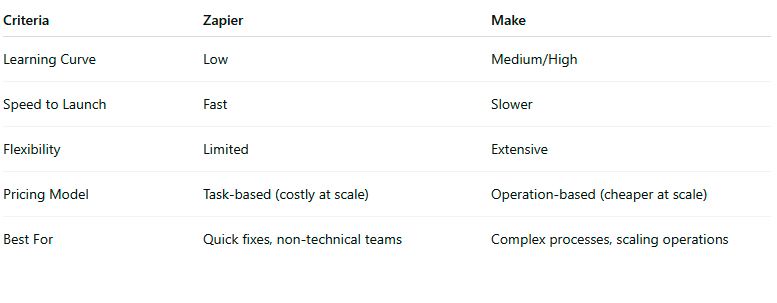

Practical Business Applications: Turning Everyday Workflows into Systems That Scale
#1 Lead Management for Service Businesses
Common problem: Leads come in from multiple sources—website forms, Facebook Ads, and referrals—but responses depend on someone manually forwarding emails or updating a shared spreadsheet.
Zapier application:
When a form is submitted on your site or ad platform, Zapier instantly triggers a workflow.
A Slack alert is sent to the sales team, and a new lead entry is created in your CRM (HubSpot, Pipedrive, etc.).
A short follow-up email is automatically sent to the prospect acknowledging receipt.
Make application:
The form data flows into Make, which checks your CRM for duplicates.
It assigns a lead score based on source, budget, and timeline (using rules you define).
High-value leads are routed directly to the right salesperson or sales region.
Each week, Make compiles a summary report of new leads, conversion rates, and response times—sent straight to management.
Business impact:
Response times drop from days to minutes. Managers can see lead flow in real time, and no one “forgets” to follow up.
#2 Order Processing for E-commerce and Retail
Common problem: Every new order triggers a chain of manual updates—accounting entries, inventory adjustments, and shipping notifications—handled by different staff or apps. Errors creep in fast.
Zapier application:
A new order from Shopify or WooCommerce triggers an automated entry in Xero or QuickBooks.
The customer gets an immediate confirmation email.
The warehouse receives a Slack notification for dispatch.
Make application:
Make takes the same order data and runs a more advanced sequence:
Checks stock levels before pushing the order to fulfillment.
Flags any low-stock products for reorder.
Creates a shipping label through ShipStation or Australia Post.
Syncs customer and order data back to your CRM.
If the customer cancels or requests a refund, Make handles the logic: updates accounting, adjusts inventory, and triggers a customer service task automatically.
Business impact:
End-to-end order processing runs hands-free. Admin time is reduced, refunds are consistent, and management always sees real-time status.
#3 Reporting and Analytics for Marketing Agencies or Consultancies
Common problem: Weekly performance reports take hours to build from five different tools—Google Ads, Meta, HubSpot, and analytics dashboards—each exporting data manually.
Zapier application:
At the end of each day, Zapier pushes new campaign data into a shared Google Sheet.
A notification is sent to the account manager when it’s ready for review.
Make application:
Make aggregates data from all ad platforms, removes duplicates, normalizes naming conventions, and stores results in a data table.
It then feeds this clean dataset into Google Data Studio or Power BI to update a visual dashboard automatically.
Every Monday morning, clients receive a performance summary email with the latest metrics.
Business impact:
Reporting that once took four hours now takes none. Team members review insights, not spreadsheets. Leadership sees live profitability by client, not lagging data.
Each of these automations isn’t about saving five minutes here or there—it’s about creating operational confidence.
When information moves cleanly through your systems, decisions happen faster, teams stay aligned, and growth becomes predictable.
The lesson: Zapier fixes pain. Make builds muscle.
Tips & Pitfalls
Tips
Start with one painful workflow. Solve something that saves at least 5+ hours a week.
Map on paper first. Tools should serve clarity, not create it.
Test before scaling. Both Zapier & Make let you simulate—use it.
Document every workflow. Future you (or your team) won’t remember why you built it.
Assign ownership. Someone must own and maintain automation, even in small teams.
Pitfalls
Automating broken processes. Garbage in = garbage out.
Over-automation. Don’t create flows nobody understands.
Ignoring cost creep. Zapier’s task-based billing surprises many SMBs.
Treating setup as “set and forget.” Automations break when apps update—check monthly.
Not tracking ROI. Hours saved or errors reduced should be measured.
Hungry for more insights?
Subscribe to Pulse and get cutting-edge marketing and business strategies delivered right to your inbox!
Subscribe to Pulse Now
Conclusion
The wrong question is Zapier or Make?
The better question is: Do I need a tool for speed, or for control?
SMBs don’t need enterprise complexity or startup chaos—they need clarity.
At SmlBiz, we help you not just pick a tool, but build an automation system that fits your business stage and scales with your growth.
👉 Ready to stop duct-taping systems and start building ones that scale?
Let’s talk about your first automation win.
FAQs
Q1: Which is easier for a non-technical team?
A1: Zapier. Its interface is built for simplicity—perfect for quick setups.
Q2: Is Make too complex for small businesses?
A2: Not if you think long-term. It takes learning, but the payoff is scalable workflows.
Q3: Can I use both Zapier and Make?
A3: Yes. Many SMBs start with Zapier for speed, then layer Make for deeper systems.
Q4: What’s the biggest mistake SMBs make with automation?
A4: Automating broken processes. Fix the system first, then automate.
Q5: How do I decide based on cost?
A5: If you run a few simple automations, Zapier is fine. If you run many workflows or need heavy data manipulation, Make is usually cheaper.
Q6: Will automation replace my team?
A6: No. It replaces repetitive tasks, so your team can focus on higher-value work.
Q7: What if I set it up wrong?
A7: That’s where guidance matters—one wrong setup can break a workflow. Our role is to design automation that actually works for your business.
Q8: Do I need IT staff to manage these tools?
A8: Not always. Small teams can manage with light training—but assigning an automation “owner” prevents drift and chaos.
Other Articles
Quarterly Workflow Reset: Stop Adding, Start Simplifying