
Building a 3-step follow-up system in ConvertKit + Zapier helps small businesses respond instantly, nurture leads automatically, and never lose momentum.
By combining ConvertKit’s personalised email sequences with Zapier’s automated triggers, every new inquiry is acknowledged, educated, and advanced — without manual effort.
This simple automation restores consistency, builds trust faster, and keeps your sales pipeline moving even when you’re busy.
Discover how to stay top-of-mind with every prospect using one seamless, automated workflow.
You’ve heard it a thousand times: “The fortune is in the follow-up.”
But if that were true, most small businesses would be rich.
Instead, here’s what usually happens:
A builder gets a web inquiry, replies once, and never follows up.
A consultant has a great discovery call — then silence.
An agency sends a proposal, waits two weeks, and blames “budget timing.”
The problem isn’t laziness.
It’s that follow-up lives in inboxes, mental notes, and good intentions — not in systems.
And so opportunities die quietly.
That’s what this article is about:
How to replace “hope they reply” with a 3-step, automated follow-up system built with ConvertKit + Zapier — one that feels personal, runs itself, and never forgets.

Follow-Up Is Not About Reminders — It’s About Rhythm
Most small businesses think automation is about saving time.
That’s the wrong lens.
The real power of automation is consistency of rhythm — ensuring your business moves in sync with your buyer’s decision journey.
Follow-up is not a reminder; it’s momentum maintenance.
Every unanswered quote, every idle lead, every “just checking in” email — is a symptom of rhythm lost.
When we rebuild follow-up systems from first principles, the question isn’t “What tool should I use?”
It’s:
“How do I maintain rhythm between my team’s actions and my buyer’s timing — without relying on memory or willpower?”
That’s the strategic reason ConvertKit + Zapier is such a powerful pair.
It doesn’t just send emails; it restores rhythm.
What It Is: ConvertKit + Zapier in Plain English
Let’s define both tools in business terms — not tech jargon.
ConvertKit is your relationship engine.
Think of it as your digital concierge — the system that sends the right message to the right person at the right time.
Zapier is your bridge builder.
It connects your other systems (forms, CRMs, spreadsheets, calendars) to ConvertKit automatically.
It says, “When this happens here, do that over there.”
Together, they create an invisible workflow that feels human but never sleeps.
No “leads slipping through the cracks.” No “who followed up with them again?”
Just rhythm.
Stay ahead of the curve!
Subscribe to our newsletter and never miss the latest in business growth and marketing strategies
Why the Default Approach Fails
Most small businesses already have some kind of follow-up.
But let’s be honest — it usually looks like this:
A contact form sends an email notification to someone’s inbox.
Someone replies manually when they have time.
If there’s no response, maybe they send another email a few days later — if they remember.
If the lead goes quiet, it’s marked “lost.”
This is the “reactive rhythm trap.”
Every step depends on human memory and timing.
And the moment you get busy, the rhythm breaks.
From a systems perspective, this is unsustainable.
You’re running a million-dollar business on a $10 process.
What Follow-Up Actually Is
Let’s strip away the complexity and rebuild from zero.
At its core, follow-up has only three objectives:
Acknowledge: Confirm you received their inquiry.
Advance: Move the conversation to the next logical step.
Align: Keep timing and expectations in sync.
That’s it.
Everything else — proposals, reminders, calls — sits under one of those three steps.
And those steps can be automated without losing the human touch.
When to Use It — and When Not To
Use This System When:
You receive regular leads from your website, landing pages, or ads.
You (or your team) often forget to follow up more than once.
You want every inquiry to feel personal without requiring manual effort.
You already use ConvertKit for newsletters or onboarding.
Don’t Use It When:
You have no clear sales process (automation amplifies confusion).
You’re still testing product-market fit (you need feedback, not automation).
You sell only high-ticket deals that always require manual, custom outreach (use a hybrid version instead).
Automation should extend your human touch, not replace it.

How It Works: The 3-Step Follow-Up System
Let’s walk through the basic structure — you can build this in an afternoon.
Step 1: Capture & Tag
Trigger: Someone fills out your website form, Calendly booking, or Typeform quiz.
Zapier Workflow:
Trigger: “New form submission.”
Action 1: Add the contact to ConvertKit.
Action 2: Apply tag: New Inquiry.
Action 3: Send personalized acknowledgment email.
Tip: Include one line that shows you read their message (“Thanks for reaching out about your kitchen renovation — here’s what happens next.”)
Step 2: Nurture & Educate
In ConvertKit, create a 3-email sequence spaced over 5–7 days:
Day 0: Acknowledgment + What Happens Next
Day 2: Case Study / Credibility Builder (“Here’s how we helped [client type].”)
Day 5: Invitation to Next Step (book call, download proposal, etc.)
These emails are automated but should read like you personally wrote them.
Step 3: Hand-Off & Notify
Back in Zapier, add a final action:
If the lead replies or books a call, tag them as Active Lead.
Notify your team in Slack, Gmail, or ClickUp instantly.
Now, every inquiry is acknowledged, nurtured, and handed off — automatically, rhythm intact.
Practical Business Example: Before & After
Before:
A boutique marketing agency receives 20 inquiries a month.
Each one gets a single email reply — when the owner has time.
By the second week, she can’t remember who’s who.
Follow-up is inconsistent; only 3 of 20 turn into calls.
After:
The same agency implements the 3-Step Follow-Up System.
Every inquiry instantly receives a personal acknowledgment and case study sequence.
Zapier notifies the team when a lead engages.
Follow-up becomes consistent. Conversion doubles to 6 of 20 calls — without more leads.
Automation didn’t just “save time.”
It preserved rhythm and compounded trust.
Comparison: Why ConvertKit + Zapier Beats Other “All-in-Ones”
Some tools promise “built-in automation” (HubSpot, ActiveCampaign, etc.).
So why use ConvertKit + Zapier?
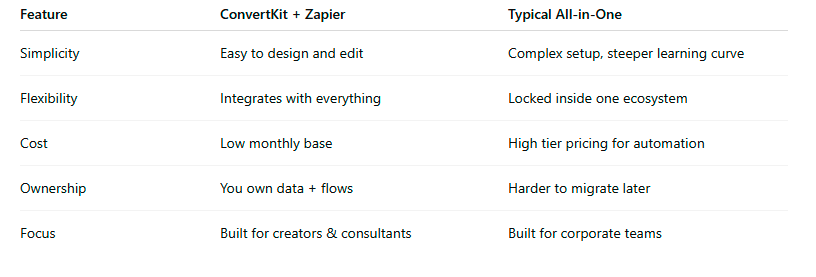
In short: you build what you need, not what the software dictates.
Tips & Pitfalls
Tips for Success:
Write your emails first. Automation follows clarity.
Name your tags and Zaps clearly. (“Inquiry → Acknowledge → Nurture → Notify.”)
Use conditional logic. If a lead replies, pause automation.
Revisit every 90 days. Businesses evolve; workflows should too.
Common Pitfalls:
Over-automating personal stages (no bots before trust).
Forgetting to test links and tags.
Ignoring timezone delays — time your first email within minutes of inquiry.
Assuming “set and forget” — automation still needs review.
Don’t miss a beat in your business growth journey!
Join Pulse and stay ahead with expert tips and actionable advice every month.
Subscribe to Pulse Today
Conclusion
Follow-up is not a task — it’s a business asset.
It’s the invisible infrastructure that compounds trust, maintains rhythm, and converts opportunity into revenue.
Every hour you spend chasing unqualified leads is an hour stolen from building systems that work for you.
The better question isn’t “Can we automate follow-up?”
It’s:
“Why haven’t we made it impossible to forget?”
That’s the promise of ConvertKit + Zapier — not just saving time, but ensuring your business always shows up when your buyer is ready.
FAQs
Q1: Can’t ConvertKit do this by itself?
A1: ConvertKit handles sequences beautifully, but it can’t trigger from external events (like a form, call booking, or spreadsheet update) without Zapier. That’s why the combo is so powerful.
Q2: What if I use another CRM like Pipedrive or HubSpot?
A2: No problem. Zapier can bridge your CRM to ConvertKit — so your follow-up runs even if your sales data lives elsewhere.
Q3: Will this feel robotic to leads?
A3: Not if you write human-sounding messages. Automation doesn’t remove personality; it removes inconsistency.
Q4: How much does this cost to run?
A4: ConvertKit (Free–$29/mo) + Zapier (Free–$20/mo for simple Zaps) = under $50/month to protect every opportunity you earn.
Q5: Can I add SMS or Slack notifications?
A5: Absolutely. Zapier can send texts via Twilio or pings to Slack, ClickUp, or Gmail — whatever fits your workflow.
Q6: What if I’m not technical?
A6: You don’t need to be. Think in steps, not scripts. We can help you map it and build the first version with you.
Q7: How fast can I set this up?
A7: Most clients build the first version in under two hours — then refine it weekly until it feels seamless.
Other Articles
How to Automate Competitor Tracking in One Hour with Browse.ai
How to Automate This Week and Reclaim 5 Hours of Calm, Focused Time
The Secret to Effortless Projects: n8n Workflow Automation for Client Management