
Every business has the same silent productivity killer: low-value admin work.
Email triage, meeting notes, scheduling, data entry, chasing invoices, updating spreadsheets — these aren’t just time-consuming, they drain mental energy you could spend on strategy, growth, and innovation.
The good news? AI has matured into a digital operations assistant that can automatically handle most repetitive tasks. Instead of spending your week buried in admin, you can delegate it to tools designed to run in the background, adapt to changing priorities, and integrate with the platforms you already use.
Below are 5 AI tools that can reclaim entire workdays each week, with real-world use cases, pros and cons, and integration details so you can choose the right fit for your business.

Motion – AI Calendar & Task Automation
Overview
Motion is more than a calendar — it’s an AI-powered time orchestration tool. It automatically prioritises your tasks, schedules meetings, and reshuffles your day in real time when things change. Think of it as a personal chief of staff who knows your deadlines and keeps you on track.
Key Features
Auto-scheduling for meetings, deep work, and personal tasks.
Real-time adjustments when deadlines shift or meetings cancel.
Team calendar visibility to reduce coordination friction.
Built-in task and project tracking.
Pros
Removes decision fatigue over “what to do next.”
Blends personal and team priorities seamlessly.
Cons
Requires a few days of use before the AI becomes truly accurate.
Ideal Use Cases
Teams with shifting project deadlines.
Executives managing conflicting priorities.
Mini Usage Scenario
Your 2 pm client presentation gets pushed to next week. Motion fills the gap with the highest-priority tasks due this week without you touching a thing, keeping your day productive.
Top Integrations
Google Calendar, Outlook, Zoom, Asana, Trello, Slack.
Best For
Agency project managers
Startup founders wearing multiple hats
Operations teams coordinating across time zones
Be the first to know!
Join our newsletter for cutting-edge strategies and tools tailored for ambitious business owners like you
Superhuman – AI Email Productivity
Overview
Superhuman is built for speed. It turns email from a slow, reactive chore into a fast, AI-driven workspace with predictive replies, inbox triage, and automatic follow-ups.
Key Features
AI-drafted replies you can approve and send instantly.
Prioritisation that spots urgent messages and hides low-priority ones.
Natural language search (“find the contract from Alex in March”).
Scheduling, reminders, and follow-up automation.
Pros
Cuts email processing time dramatically.
Keyboard shortcuts make it lightning fast.
Cons
Premium cost may be high for large teams.
Ideal Use Cases
Professionals drowning in daily email volume.
Client-facing roles needing quick, accurate replies.
Mini Usage Scenario
By 9am, Superhuman has sorted 70% of your inbox into low-priority folders and pre-written replies to meeting requests. You clear your inbox in under 10 minutes.
Top Integrations
Gmail, Outlook, Salesforce, HubSpot, Slack.
Best For
Consultants managing multiple clients
Sales reps juggling outreach
C-level execs with overloaded inboxes
Fireflies.ai – AI Meeting Recorder & Notetaker
Overview
Fireflies is the AI team member who never misses a detail. It joins your calls, records, transcribes, and generates action-ready summaries so you can stay engaged instead of scribbling notes.
Key Features
AI-generated meeting notes with action items and decisions.
Searchable transcripts across your entire meeting history.
Automatic CRM updates after calls.
Multi-language transcription.
Pros
Frees you from note-taking entirely.
Creates a searchable knowledge archive for your team.
Cons
May miss subtle tone or context in complex topics.
Ideal Use Cases
Capturing customer feedback during sales calls.
Aligning distributed teams without constant replays.
Mini Usage Scenario
After a 45-minute strategy meeting, Fireflies posts a timestamped summary to Slack, listing each owner’s action items — no one asks, “Who’s doing what?”
Top Integrations
Zoom, Microsoft Teams, Google Meet, Salesforce, HubSpot, Notion.
Best For
Product managers
Sales enablement teams
Customer success managers

ClickUp with AI – Project & Document Automation
Overview
ClickUp’s AI features turn scattered project updates and raw notes into organised plans, SOPs, and status reports — without you touching a keyboard. It’s like having a project coordinator who listens, writes, and organises instantly.
Key Features
Summarises long threads into key updates.
Converts brainstorming notes into structured project plans.
Auto-generates SOPs and checklists.
Predicts due dates and assigns tasks based on workload.
Pros
Replaces multiple tools for tasks, docs, and updates.
Highly customizable workflows to fit any process.
Cons
Can feel overwhelming for teams who need simplicity.
Ideal Use Cases
Multi-stage campaigns with many moving parts.
Building a searchable knowledge base without manual formatting.
Mini Usage Scenario
After a brainstorming call, ClickUp AI organises the messy notes into a fully formatted campaign plan with deadlines and owners assigned.
Top Integrations
Google Drive, Slack, Zoom, GitHub, Outlook.
Best For
Creative agencies
Product development squads
Marketing operations managers
Zapier with AI Actions – Workflow Automation & Decision-Making
Overview
Zapier has always been the glue between apps. Now, with AI Actions, it doesn’t just move data — it interprets, decides, and customises what happens next.
Key Features
AI-powered data enrichment and formatting.
Conditional branching with AI decision-making.
Automates multi-step workflows across different apps.
Turns freeform text (like an email inquiry) into structured data.
Pros
Connects thousands of tools without code.
Handles complex workflows that normally require a developer.
Cons
Without documentation, complex automations can become hard to maintain.
Ideal Use Cases
Automatically nurturing leads after form submissions.
Updating multiple systems at once after a single trigger.
Mini Usage Scenario
A new lead fills out your form. Zapier AI enriches their company data, drafts a personalised email, adds them to your CRM, and creates a follow-up task in ClickUp — all in under 30 seconds.
Top Integrations
Google Sheets, Slack, HubSpot, Shopify, Airtable, Notion.
Best For
E-commerce growth teams
Marketing automation specialists
SaaS onboarding teams
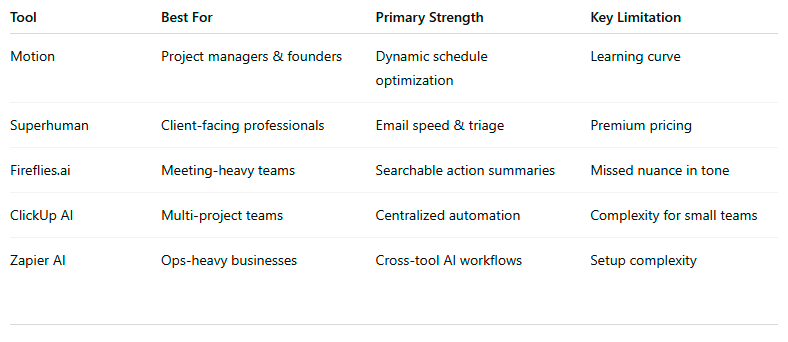
Comparison Snapshot
Don’t miss a beat in your business growth journey!
Join Pulse and stay ahead with expert tips and actionable advice every month.
Subscribe to Pulse Today
FAQs
Q1: How much time can AI tools realistically save on admin work?
A1: With the right setup, these tools can cut 5–10 hours of admin time per week, depending on your workload and how many repetitive tasks you automate.
Q2: Do these AI tools require technical skills to use?
A2: Most are designed for non-technical users. Tools like Zapier may need some initial setup guidance, but no coding is required.
Q3: Can AI tools work together as one integrated system?
A3: Yes. For example, Motion can schedule your AI-generated ClickUp tasks, Fireflies can push meeting notes into ClickUp, and Zapier can connect everything for automated data flow.
Q4: Are these tools safe for sensitive business data?
A4: All the featured tools use encryption and industry-standard security protocols. Still, review their privacy policies to ensure compliance with your business standards.
Q5: What’s the biggest mistake businesses make when adopting AI tools?
A5: Jumping into multiple tools without a clear workflow plan. This leads to overlap, confusion, and under-utilisation.
Q6: How do I choose the right tool for my business?
A6: Start by identifying your biggest admin bottlenecks — email, scheduling, meetings, or data entry — then choose one tool to solve that problem first.
Q7: Will these tools replace admin staff?
A7: They’re better seen as support tools that handle repetitive work, freeing your team for higher-value, strategic activities.
Conclusion
The average business leader spends over 50% of their time on admin tasks that don’t directly generate revenue. The right AI tools don’t just speed up these tasks — they remove them from your plate entirely.
By combining smart scheduling, email triage, automated meeting notes, project organisation, and cross-platform workflow automation, you can reclaim hours every single day.
Want to build a custom AI admin stack for your business?
Let’s design and implement it so you can focus on growth, not busywork.
Other Articles
Do This 20-Minute Email System Audit Before You Send Another Campaign