
Running a business shouldn’t mean running in circles.
Between managing meetings, replying to emails, and juggling to-do lists, most business owners spend their day reacting instead of leading.
That’s where AI productivity tools come in.
These tools don’t just save time—they automate the chaos.
From scheduling smart meetings to clearing your inbox, the right AI can handle your administrative work, allowing you to focus on driving growth.
Whether you’re a solo founder or a small team scaling fast, these tools can transform your day.

#1 Motion – Your AI Executive Assistant
Overview:
Motion is an AI-powered productivity app that merges your calendar, task manager, and project planner. It automatically prioritises tasks, books meetings, and reschedules items as your day changes.
Key Features:
Smart daily planning based on deadlines and priorities
Calendar auto-scheduling and meeting time optimisation
Task manager integrated with project timelines.
Automatic conflict resolution
Pros:
Ideal for busy professionals with dynamic schedules
Reduces manual calendar edits
Clean, visual UI
Cons:
Premium pricing may be high for early-stage users.
Less flexible for teams with fixed schedules
Ideal Use Cases:
Founders and execs who need smart schedule reshuffling
Teams managing multiple client projects with shifting priorities.
Stay ahead of the curve!
Subscribe to our newsletter and never miss the latest in business growth and marketing strategies.
#2 Reclaim.ai – Smarter Scheduling for Teams
Overview:
Reclaim uses AI to protect your time. It syncs with your calendar and automatically blocks time for habits, tasks, and meetings, prioritising focus without manual effort.
Key Features:
Smart time blocking for tasks and routines
Auto-reschedules tasks based on real-time availability
Shared meeting insights and analytics for team collaboration
Slack and Zoom integrations
Pros:
Syncs easily with Google Calendar
Focuses on time protection, not just scheduling
Strong team collaboration features
Cons:
Works best in the Google ecosystem
Can require a setup period to optimise rules
Ideal Use Cases:
Remote teams juggling personal focus and collaboration
Managers trying to protect time for deep work.
#3 Superhuman – The Fastest AI Email Experience
Overview:
Superhuman is an ultra-fast email client powered by AI. It predicts responses, auto-suggests replies, and helps you fly through your inbox with blazing speed.
Key Features:
AI-generated reply suggestions
“Undo Send,” “Remind Me,” and snoozing features.
Inbox zero productivity framework
Deep Gmail and Outlook integration
Pros:
Speeds up daily email processing by hours
Great UX and shortcuts for power users
High-end feel
Cons:
Invite-only and expensive
Overkill if you get <50 emails a day
Ideal Use Cases:
Entrepreneurs with high email volume
Sales and execs who rely on fast, polished email replies

#4 Magical – Automate Repetitive Tasks in Emails & Forms
Overview:
Magical is a browser extension that automates repetitive typing. Whether you’re sending the same intro message, booking emails, or filling out forms, it helps you insert AI-powered text in seconds.
Key Features:
AI snippet suggestions and message recall
Text expansion for any website or app
Integration with Gmail, LinkedIn, and CRMs
AI autofill for repetitive data entry
Pros:
Works across platforms—email, CRM, support
Saves time without complex automation setups
Great for outreach and admin teams
Cons:
Browser-based only
Not ideal for full-blown workflow automation
Ideal Use Cases:
Customer service reps and salespeople doing outreach
Admins handling repeat form submissions or responses
Don’t miss a beat in your business growth journey!
Join Pulse and stay ahead with expert tips and actionable advice every month.
Subscribe to Pulse Today
#5 TimeHero – AI Task Management That Adapts
Overview:
TimeHero automatically plans tasks based on your availability. Unlike static task apps, it reshuffles your to-do list based on calendar changes, urgency, and deadlines.
Key Features:
Auto-scheduling of tasks with dependencies
Project planning with automated timelines
AI rescheduling when priorities shift
Team progress dashboards
Pros:
Great for planning project timelines
Helps teams avoid missing deadlines
Flexible to last-minute changes
Cons:
UI can feel complex for solo users.
Learning curve for automation rules
Ideal Use Cases:
Small teams with multiple overlapping projects
Freelancers needing deadline-driven task planning
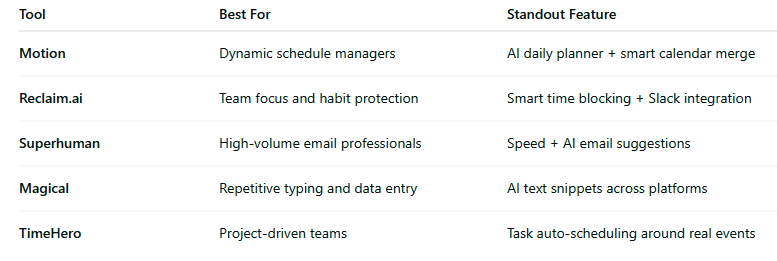
Quick Comparison
Why AI Productivity Tools Matter
Using AI to manage your calendar, emails, and to-do list is not about doing more—it’s about making space for what matters.
With automation handling routine work, you gain:
- More strategic time to grow your business
- Fewer missed deadlines or double bookings.
- Peace of mind that nothing is slipping through the cracks
These tools offer you what most productivity systems don’t: adaptability. AI learns, reschedules, and improves based on your behaviour.
Ready to Reclaim Your Time?
If you’re still buried in busywork, you don’t need another planner—you need a partner. These AI tools give you back control over your time, inbox, and focus.
Want to implement AI in your business?
Let’s talk about how we can help you automate operations, scale smarter, and move faster.
FAQs
Q1: What are the best AI tools to automate my calendar and daily tasks?
A1: Some of the top AI tools for calendar and task automation include Motion, Reclaim.ai, and TimeHero. These tools intelligently schedule tasks, prioritise meetings, and automatically adjust your day as changes arise.
Q2: Can AI tools really help reduce email overload?
A2: Yes. Tools like Superhuman and Magical are specifically built to manage high-volume email activity. They offer AI-generated responses, email shortcuts, and smart reminders to help you clear your inbox faster and respond more effectively.
Q3: Are these AI productivity tools suitable for small businesses?
A3: Absolutely. In fact, small businesses benefit the most because these tools eliminate the need for extra admin staff or time-consuming manual processes. Most offer flexible plans for individuals, teams, or growing businesses.
Q4: Do AI scheduling tools work with Google Calendar or Outlook?
A4: Yes. Tools like Reclaim.ai, Motion, and TimeHero integrate with Google Calendar, and many also support Outlook. This ensures your schedule stays up to date across platforms without switching apps.
Q5: Is it safe to use AI tools for sensitive email and calendar data?
A5: Most reputable AI tools follow strong data privacy protocols, including encryption and compliance with regulations like GDPR. However, always check each tool’s security policy and data handling practices before onboarding.
Q6: Can I use multiple AI tools together without overlap?
A6: Yes, but with strategy. For example, you can use Reclaim for time blocking, Superhuman for email, and Magical for repetitive text automation without conflict. The key is to assign each tool a clear role in your workflow.
Q7: How quickly can I see results from using AI automation tools?
A7: Most users report noticeable productivity gains within 7–14 days. The impact grows as the AI learns your habits, priorities, and preferences, especially when used consistently.
Other Articles
Simplify to Scale: 5 Proven Strategies for Faster Growth
How Manual Processes Drain Time, Money, and Growth from Your Business