A messy tech stack drains time, overwhelms teams, and creates costly inefficiencies—often without anyone noticing.
This article explains why most businesses unknowingly build bloated systems and how to fix them using a role-first, clarity-driven approach. If your tools feel heavy instead of helpful, it’s time to simplify and rebuild for speed, focus, and growth.
You’re doing everything right.
The tools are cutting-edge.
Your team’s stacked with smart people.
There’s no shortage of effort.
But somehow, the work feels harder than it should.
Projects stall. Data lives in too many places.
You spend more time managing tools than making progress.
And no one’s quite sure which system to trust anymore.
The promise was clarity, automation, and scale.
What you’ve got is noise, rework, and fatigue.
And if you’re honest, the tech that’s supposed to help you—might be holding you back.
That’s not just frustrating—it’s expensive.
Not just in money but in momentum.
Every missed insight. Every duplicated task. Every decision delayed by tool confusion…
It’s a slow leak you can’t afford to ignore.
But here’s the shift:
The solution isn’t another tool. It’s a different lens.
Because your stack isn’t broken—your logic for building it is.
In this post, we’ll unpack:
- Why even the smartest teams fall into stack sprawl
- How the wrong mental model creates friction by design
- What a truly lean, high-performing tech stack looks like
- And how to use AI effectively—only once your system is ready for it
If you’re tired of drowning in tools and chasing complexity disguised as progress,
this is your reset.
Let’s start by challenging the biggest lie in modern business systems.

Why “More Tools = More Power” Is a Dangerous Lie
Adding more tools doesn’t make your business more powerful—it makes it more fragile.
The illusion is control. You onboard a shiny new platform to fix content, automate sales, or align your team. But months later, nothing’s faster. Nothing’s clearer. And no one knows where to look for the truth.
What started as a productivity boost becomes a burden:
- Tools overlap
- Data lives in silos
- Teams duplicate effort
And worst of all, the original problem still exists, just with more logins.
The frustration isn’t just operational—it’s existential.
You’re solving problems with software when the issue is system design. A broken content process can’t be fixed by Notion. A disjointed sales funnel doesn’t get smoother with another CRM. Every tool added without structural clarity becomes another source of confusion.
Most people don’t realise they’re scaling dysfunction.
Every tool without a defined role adds drag. Every redundant platform multiplies context-switching. Every new dashboard creates reporting debt. That’s not growth—it’s tech debt disguised as progress.
What that means for your business is this:
You’re bleeding time, energy, and trust. Internally, the team starts improvising. Externally, customers feel the cracks—missed follow-ups, delayed responses, inconsistent messaging.
The longer this continues, the more momentum you lose, and the more your team resents the very systems meant to support them.
But relief comes the moment you stop chasing features and start designing flow.
One tool that’s frictionless, fast, and trusted beats three that are redundant, bloated, and unloved. Efficiency isn’t about doing more—it’s about doing less, better.
This is where your identity shifts.
From someone who builds a tech stack…
To someone who builds a system that works.
Why should you care right now?
Because every week this stays bloated, you’re burning hours you can’t recover.
The longer your team works around your tools, the harder it becomes to trust any system at all.
Pro Tip:
Cut one underused tool this week—something your team “might use” but doesn’t.
Because clarity isn’t built by addition. It’s built by subtraction. Every tool you remove sharpens the role of what’s left. And in that constraint, real system design begins.
Stay ahead of the curve!
Subscribe to our newsletter and never miss the latest in business growth and marketing strategies
The Hidden Waste No One Tracks—Decision Drag
Their operations manager thought the team was just overwhelmed.
But when they mapped out their lead-to-close process, they found 7 tools involved—and 4 of them required manual syncing. No one owned the full picture, and decisions were constantly delayed.
After consolidating the stack around role-based functions, their proposal time dropped from 5 days to 48 hours.
It wasn’t a hiring issue. It was a clarity issue.
Your team isn’t slowed down by tasks—they’re slowed down by decisions.
Every time someone has to stop and ask:
“Where’s that info?”
“Which system do we trust?”
“Who’s responsible for this?”
…you’re not doing the work—you’re circling it.
This is decision drag—the invisible friction that compounds every time a system doesn’t support fast, confident action. And it’s costing you more than you think.
Most businesses fix for speed, but ignore clarity.
They automate emails, add dashboards, and layer AI—but none of it works if the team is stuck making micro-decisions all day.
- “Should this be in ClickUp or Slack?”
- “Do I wait for this data or move ahead?”
- “Is this the latest version or not?”
Each of these pauses costs seconds, but multiplied across your team, they become hours of lost momentum every week.
And it gets worse with scale.
The more tools you use, the more places you must check.
Your analytics live in one app.
Your sales notes in another.
Your tasks in a third.
Now every decision requires a scavenger hunt. And that cognitive cost? It doesn’t just burn time—it burns trust in the system.
What that means for your business is simple:
The more decisions your stack introduces, the fewer your team actually executes.
They don’t act faster—they defer, delay, and double-check.
This isn’t about software. It’s about how fast your company can move when clarity is low and confusion is high.
But there’s a fix—and it starts with fewer steps, not more tools.
When your team knows where to go, what’s current, and what action to take, momentum returns. Decision fatigue fades. Execution gets sharper. And now your systems support strategy instead of sabotaging it.
This is the shift in identity.
From a business that hoards data…
To one that makes decisions faster than the competition.
Why should you care right now?
Because the longer your team hesitates, the more opportunities pass you by.
Every 30-second delay adds up to weeks of lost productivity every quarter.
Pro Tip:
Map one key workflow end-to-end. Identify how many tools a person has to touch just to complete a single task.
Because velocity doesn’t come from better tools—it comes from fewer blockers. When you reduce decision drag, you reclaim your team’s ability to move with confidence. And in business, speed of clarity is speed of growth.
How the Wrong Mental Model Creates Stack Sprawl
I once added a project management tool to fix delays without realizing we already had three tools doing overlapping tasks.
Instead of solving the issue, I made it worse.
People didn’t know where to update tasks. Deadlines slipped. Accountability vanished.
The tool wasn’t broken. My logic was. That moment taught me to ask: “What’s the role we need?” before I reach for a solution.
Your tech stack didn’t become messy by accident—it became messy because the logic behind it was flawed.
Most businesses don’t start with system design.
They start with symptoms:
“We need a better way to track leads.”
“We need a faster way to collaborate.”
“We need to automate this.”
Then they grab the first app that promises a fix.
And that’s how it begins: one tool at a time, patched onto an undefined process.
Stack sprawl happens when you build around tools, not workflows.
There’s no north star. No architecture. Just reactive buying.
Need to fix content ops? Try Notion.
Need marketing automation? Add HubSpot.
Customer support? Try Intercom.
But soon, you’re managing tools instead of managing work.
Each one solves a local problem but creates global fragmentation.
Most people don’t realise they’re building a digital junk drawer.
Every time you add a tool without redesigning the surrounding process, you multiply complexity.
And the worst part? Because each tool feels useful in isolation, no one questions the whole.
But your team feels it:
Endless toggling
Repeated context-switching
Conflicting data
“Wait, didn’t we already try this?”
That’s not an adoption problem. It’s a thinking problem.
What that means for your business is this:
The more reactive your stack, the more rigid your growth becomes.
You can’t scale workflows that were never intentionally built.
And you can’t empower teams with tools they don’t trust—or understand how to use together.
But here’s the relief: you don’t need more tools—you need a better frame.
When you rebuild your stack around flows, not features, you simplify everything:
Clearer systems
Less maintenance
Faster onboarding
Better data
Now, tools serve a system, and that system supports your team.
This is the identity shift.
From a business that collects tools…
To one that designs intentional systems.
Why should you care right now?
Because every unexamined tool adds more friction to your team’s day.
And the longer you wait to fix the architecture, the more brittle and expensive your growth will become.
Pro Tip:
Take your most-used process and ask: “Was this designed intentionally or patched together?”
Because systems scale, patches don’t. Every hour you spend redesigning the workflow—not just the tool—gives you a foundation you can grow on without chaos. That’s the difference between operational control and constant firefighting.

What a Functional Stack Actually Looks Like (And Why It Has Nothing to Do with Features)
A good tech stack isn’t the one with the most features—it’s the one you don’t have to think about.
If your team constantly asks:
“Where do I put this?”
“Which system owns this task?”
“What’s the source of truth?”
…then your stack isn’t functional—it’s fragmented.
And no new tool will solve that until the design behind the stack changes.
Most teams think their tech isn’t working because it’s not powerful enough. The opposite is usually true.
When a tool tries to do everything—or competes with another tool in the same space—it creates confusion, not capability.
Now your stack isn’t supporting your workflow—it’s getting in the way of it.
Features don’t fix friction. Clarity does.
Functional stacks have less, but work harder.
They feel light, fast, invisible.
No one wastes time guessing. The system just works.
Tasks auto-route
Notifications go where they should
Reports generate without scrambling
It’s not magic. It’s thoughtful design paired with clear ownership.
Most people don’t realise they’re optimising for control, not flow.
They pile on tools to feel secure. But every added step adds friction.
The best-performing teams don’t use more—they use fewer, smarter tools that integrate tightly into workflows.
What that means for your business:
Every extra platform, every redundant interface, every workaround—it’s a tax on execution.
A functional stack eliminates choice where choice isn’t needed, so your team can focus on work—not navigation.
Relief comes when the system disappears.
You stop “managing” tools. Your team moves with speed. Decisions happen naturally.
And suddenly, everything feels easier—not because you worked harder, but because you finally worked cleaner.
This is the identity shift.
From a business that tolerates tech clutter…
To one that moves effortlessly through well-designed systems.
Why should you care right now?
Because every feature you never use, every setting your team avoids, every app that overlaps is compounding distraction.
And the longer your systems remain bloated, the harder it is to build anything with agility.
Pro Tip:
Audit your top 3 tools and list every feature your team actually uses. Cut or replace anything where less than 30% of features are used weekly.
Because functionality isn’t about what a tool can do—it’s about what it consistently does. Power comes not from potential, but from precision. And precision is what creates trust, speed, and scale.
The Role-First Stack—A Smarter Way to Work
Most stacks fail because the tools aren’t treated like hires—they’re treated like hacks.
When you add a new app without a defined role, you’re not scaling your system. You’re just adding weight.
Every tool in your business should have a job description—clear responsibilities, clear handoffs, clear accountability.
If a tool can’t answer: “What job do I own—and how do I report back?”
…it’s not part of a system. It’s part of your chaos.
A smarter stack isn’t built around tools. It’s built around roles.
Instead of asking “What does this tool do?” ask “What role do we need filled?”
Do you need an assistant? A marketer? A connector? A customer rep?
Then assign one tool to each role, like you would with team members.
Here’s a simple role-first structure:
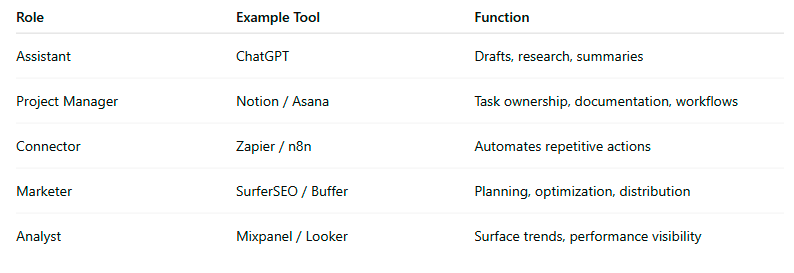
Now you’re not stacking tools. You’re building a lean digital team.
Most people don’t realise they’ve hired five people for the same job—and none of them talk to each other.
It’s no wonder teams are frustrated. When ownership is unclear, execution stalls.
And when your tools don’t support each other, every system breaks under pressure.
What that means for your business:
Redundant tools multiply confusion.
Undefined roles kill accountability.
And unclear systems make it impossible to scale without micromanagement.
But when you design your stack around jobs, not features, everything shifts.
You can clearly measure what’s working
You reduce unnecessary overlap
You empower people to trust the system
Relief doesn’t come from using fewer tools.
It comes from using the right tool for the right job—and nothing else.
From a business duct-taping solutions together…
To a company that builds with intention—and scales with clarity.
Why should you care right now?
Because every role your tools don’t clearly fill gets offloaded onto your team.
And every week that goes by without a role-first stack is a week your systems remain bloated, slow, and unscalable.
Pro Tip:
Create a spreadsheet with five core roles and list one tool under each. If a tool shows up under more than one, you have overlap—time to reassess.
Because when you treat tools like team members, you create a structure that’s accountable, resilient, and easy to grow. And that’s what makes scaling sustainable, not just possible.
Don’t miss a beat in your business growth journey!
Join Pulse and stay ahead with expert tips and actionable advice every month.
Subscribe to Pulse Today
The One Factor Most People Overlook—Cognitive Energy
Here’s what no one admits out loud: the most exhausting part of work isn’t always the work—it’s trying to figure out where the work lives.
When your team spends half their day switching tabs, second-guessing data, or recreating tasks lost in a shuffle, they’re not just losing time—they’re losing sharpness.
The smartest people on your team are being pulled down by shallow systems. And that’s the real cost most businesses never calculate.
Every tool you add doesn’t just cost money—it costs mental energy.
If your team dreads opening their dashboards or second-guesses every login, it’s not a tech issue—it’s cognitive overload.
That slow, quiet fatigue you’re seeing? It’s not burnout from overwork. It’s burnout from over-navigation.
Each interface, update, and context switch may seem small. But stacked together, they drain the focus your team needs to do real work.
Most people don’t realise the brain only has so many good decisions in a day.
And your bloated stack is eating them up before lunch.
You’re toggling between Slack, Notion, ClickUp, Airtable, HubSpot, and Google Sheets… just to send a report.
You’re checking three platforms to answer one question.
You’re wasting willpower just trying to find where the task lives.
That’s not productivity. That’s system-induced exhaustion.
What that means for your business is this:
You’re not just wasting time—you’re exhausting your team’s best thinking on admin.
And when your top performers feel mentally drained before they’ve done any strategic work, your business slows down, no matter how advanced your tools are.
But relief is possible when you see cognitive energy as your most limited resource.
The best systems remove decisions, not add them.
One place to look.
One clear owner.
One frictionless flow.
This isn’t about streamlining interfaces. It’s about preserving attention for what matters.
From a company that floods its people with noise…
To one that protects focus like an asset.
Why should you care right now?
Because every minute your team spends navigating complexity is a minute not spent building, selling, or innovating.
And the longer your system drains their clarity, the faster your momentum stalls.
Pro Tip:
Identify your team’s three most frequent tasks and audit how many platforms are touched in each.
Because protecting your team’s mental energy is a competitive advantage. The businesses that win aren’t just faster—they’re sharper. And sharpness comes from building systems that guard focus, not scatter it.
Conclusion
You’ve tried to fix the chaos with more tools.
You’ve subscribed, integrated, automated—hoping that one more feature would finally make things smoother.
But deep down, you already know: this isn’t working.
Your team is overwhelmed. Your systems are tangled. And your growth feels harder than it should.
That’s the cost of staying stuck in a stack designed by reaction, not intention.
Every bloated platform, every extra step, every missed handoff—it’s not just a nuisance. It’s a slow leak draining your momentum, your clarity, and your confidence.
But here’s the shift:
You don’t need more software.
You need a system that breathes.
A system where:
Every tool has a job.
Every action has a place.
Every person knows where to look, what to do, and what matters now.
This isn’t about AI.
It’s about building with clarity, operating with freedom, and finally scaling with ease.
You’ve done enough the hard way.
Let your business breathe.
So here’s your decision point—one that matters.
You can keep managing around broken systems, leaking time and energy while your team quietly burns out.
Or you can design a smarter, simpler stack—one that works with you, not against you.
You’re not buried under tools.
You’re buried under choices you no longer need to make.
That’s optional now.
The next step is yours:
Stay stuck in the noise—or clear the path forward.
One smart decision at a time. Starting today.
Action Steps
Map Your Current Tools
Make a complete list of every software, app, and platform your business uses—across departments. Include everything: project management, CRM, chat, automation, reporting, design, scheduling.
Why this matters: You can’t simplify what you haven’t surfaced. Visibility is the first step toward clarity.
Assign a Clear Role to Each Tool
For each tool, define its single primary job. Use role categories like: Assistant, Project Manager, Marketer, Connector, Analyst, or Customer Rep.
If a tool can’t be clearly assigned—or if multiple tools are doing the same job—it’s a red flag.
Audit for Overlap and Redundancy
Look for tools that duplicate functionality. Example: Are you using both ClickUp and Notion for task tracking? Choose one and retire the other.
The leaner the stack, the lower the friction. Consolidation drives speed and reduces cognitive load.
Map One Core Workflow End-to-End
Pick one high-friction process (e.g., lead generation, onboarding, reporting) and trace how it moves across tools. Count every click, login, and delay.
Wherever flow breaks, friction hides—and that’s where performance leaks.
Eliminate or Reassign Low-Usage Tools
If a tool isn’t used weekly—or if it doesn’t streamline, clarify, or accelerate—cut it or replace it. Document the change and communicate it to your team.
This isn’t about less tech. It’s about more momentum.
Rebuild With a Role-First Stack
Start with the roles your systems need to support, then assign one tool per role. This keeps your structure focused, accountable, and easy to evolve.
Build your stack like a team: each tool has a job, and they all work together.
Protect Cognitive Energy by Reducing Decision Points
Minimise tool-switching. Create default flows. Clarify ownership. Automate repetitive steps only once the system works cleanly.
Your team’s attention is your most valuable resource—protect it ruthlessly.
FAQs
Q1: What is a messy tech stack?
A1: A messy tech stack is a disorganised collection of tools, apps, and platforms that lack clear roles, create workflow confusion, and often overlap in function. Instead of streamlining operations, it slows down decision-making and drains team energy.
Q2: How do I know if my tech stack is too bloated?
A2: If your team uses multiple tools for the same task, frequently switches between platforms, or struggles to find reliable data, your tech stack is likely bloated. Audit for redundancy, underused software, and decision bottlenecks.
Q3: What are the risks of using too many tools in a business?
A3: Excess tools increase costs, cause data fragmentation, and lead to cognitive overload. They also slow down workflows, create unclear responsibilities, and result in poor adoption by your team.
Q4: What’s the best way to simplify a business tech stack?
A4: Start by mapping all current tools. Assign each one a clear role. Eliminate overlaps and unused platforms. Then rebuild your stack around roles (e.g., Assistant, Connector, Project Manager) rather than features.
Q5: How do I run a tech stack audit?
A5: List every tool in use across your company. Identify its function, user adoption, overlap with other tools, and its role in daily operations. Look for tools with low engagement or unclear purpose and consider consolidation.
Q6: How does cognitive load affect productivity?
A6: Each tool your team has to log into, learn, or switch between adds mental friction. High cognitive load leads to fatigue, slower decisions, and burnout—especially when systems are poorly integrated.
Q7: Can AI help improve a messy tech stack?
A7: AI can support clarity, but only if it’s embedded into a well-designed system. Adding AI to a broken or chaotic stack simply magnifies the confusion. Start with system clarity, then layer in AI where it enhances speed or decision quality.
Bonus: 3 Unconventional Fixes That Redesign Your Stack from the Inside Out
Most tech stack advice focuses on tools, features, and integrations.
But the most powerful upgrades aren’t found in app settings—they’re found in how you think, decide, and design.
Here are three unconventional—but transformative—shifts to consider as you rebuild for clarity, not complexity.
- Track Emotional Friction, Not Just Workflow Friction
What it is:
Most businesses measure efficiency in clicks and time. But what if the better metric was frustration?
How to use it:
Ask your team one question:
“Which tool, step, or process makes you hesitate, procrastinate, or quietly swear under your breath?”
That’s where emotional friction lives.
And where frustration lives, so does hidden inefficiency.
Why this works:
When people emotionally resist a tool—even if it’s “working”—they disengage. They delay. They find workarounds.
Fixing emotional drag unlocks faster adoption, smoother collaboration, and higher team energy.
What to do:
Create an “Emotional Stack Audit.” No screenshots. No demos. Just honest conversations.
Then fix the system that’s draining trust, not just the one that’s running slow.
- Quantify Your Tool Debt—Not Just Subscription Costs
What it is:
Tool debt is the hidden cost of keeping software that no longer fits your business.
How to use it:
Calculate:
Time spent per week managing or maintaining the tool
Time lost due to confusion, rework, or support tickets
Team members’ emotional resistance or retraining load
Then ask: Is this tool paying you back in clarity, speed, or insight?
Why this works:
It reframes tools as strategic hires, not fixed costs.
A $20/month app might cost your team 10+ hours/month in distraction.
That’s not cheap—it’s expensive.
What to do:
Assign a dollar value to that lost time and mental friction.
If it’s higher than the tool’s benefit, it’s time to retire or replace it.
- Apply the 72-Hour Simulation Rule Before You Commit
What it is:
Most teams buy new tools from a sales demo, not from actual need.
How to use it:
Before committing to a new platform, simulate its intended function manually for 72 hours.
Want a lead scoring tool? Score leads manually using a spreadsheet for three days.
Want to automate task assignment? Try doing it by hand within your project manager.
Why this works:
If a process still feels heavy without the tool, the tool won’t fix it.
Tools amplify working systems—they don’t rescue broken ones.
What to do:
Validate the process before the purchase.
When it’s worth automating, it will already feel lean.
When it’s still confusing, no tool will save it.
Final Thought:
You don’t need more complexity.
You need better questions, deeper clarity, and systems that serve humans—not the other way around.
These small, unconventional shifts will help you build a stack that runs clean, earns trust, and gets out of your team’s way.
Other Articles
How to Reset Your Business Systems in 30 Days Without Burning Out
From Chaos to Control: How To Automate Your Small Biz Workflows